خصم 31%
Generic
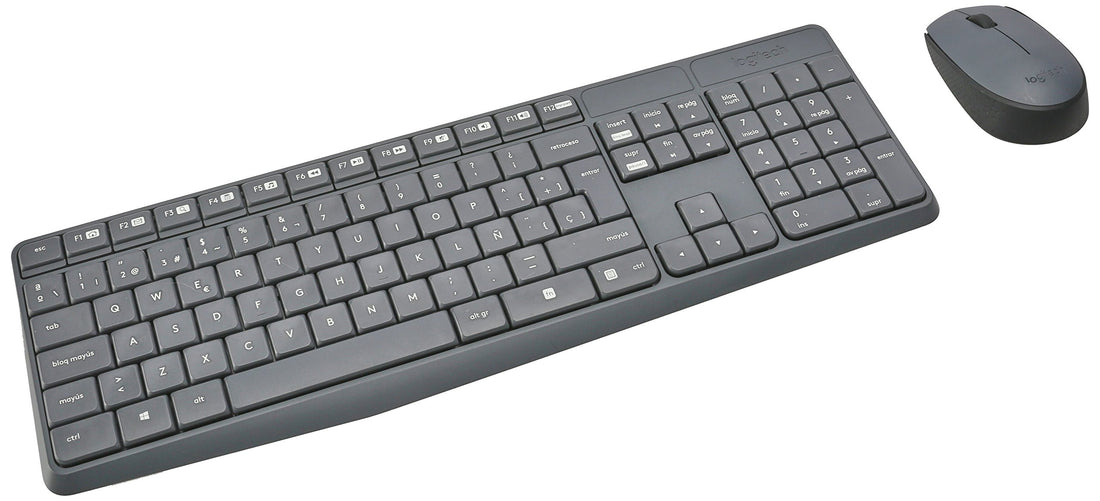
Logitech MK235 Wireless Keyboard and Mouse Combo for Windows, 2.4 GHz Connection with Unifying USB Receiver, 15 F Keys, Long Battery Life, Compatible with PC, Laptop - Black
✓ منتج أصلي
LE 3,297
LE 4,761
وفّر LE 1,464
السعر شامل الضريبة · الدفع عند الاستلام متاح
كمية محدودة — اطلب قبل ما يخلص
🚚
توصيل خلال 2-5 أيام — لكل محافظات مصر · الدفع عند الاستلام
الدفع عند الاستلامVISAMastercardValU
🚚
توصيل 2-5 أياملكل المحافظات
💵
دفع عند الاستلامادفع لما يوصلك
✅
أصلي 100%مستورد ومضمون
↩️
إرجاع خلال 14 يومبدون أسئلة
الوصف
- Keyboard with usual layout: No need to learn new things. You'll enjoy the convenience and simplicity of a traditional full-size keyboard layout from day one
- Long battery life: Type up to three years between battery changes and use the mouse for up to a year before having to change the battery
- BUILT TO LAST - Durable construction with sturdy tilting legs and splash-resistant design. Anti-wear treatment on each key so that the letters never disappear from the keys
- Reliable wireless technology: Simply plug in the tiny USB receiver to start enjoying a stable, lag-free connection. Your wireless keyboard and mouse will remain connected up to 10 meters (33 feet) away
- This box contains: Keyboard, Mouse, Wireless Receiver, User Documentation, 2 AAA Keyboard Batteries, 1 AA Mouse Battery
- Note! If the mouse cursor or keyboard input is slow or not working properly, close all open applications. If performance improves, the number of open applications may be interfering with your PC's connection to the mouse or keyboard. Check the reported battery levels. For Bluetooth connections, select Home > Settings > Devices > Bluetooth and other devices. For wireless connections, replace batteries. Restart your PC. This will update the drivers if updates have been made recently.
- Change the mouse cursor settings. Select Home > Settings > Devices > Mouse > Additional Mouse Options > Pointer Options and adjust the pointer speed.
- If the keyboard or mouse does not do what I want, you can change the settings, set the left click, right button and center button, main settings, and scroll resolution. Select Start > Settings > Devices > Mouse to make basic changes.
LE 3,297LE 4,761